
Bring your people together for every event
Staffed makes it easy for staff and volunteers to pick up shifts, and for you to know who is coming. Requests, approvals and reminders, all in one friendly place.
Free for up to 25 people. No card needed.
Simple for you, simple for them
Staffed replaces the spreadsheet, the sign-up sheet and the 40 text messages with one place everyone checks.
Share the shifts
Ushers, ticket scanners, bartenders, guest services: post how many of each you need and when. Everyone hears about it by email.
People pick what fits
Staff and volunteers request shifts from their phones. Full shifts get a waitlist that offers dropped spots to the next person.
You welcome them in
Approve with a tap. Confirmations, calendar invites and a reminder before each shift go out for you.
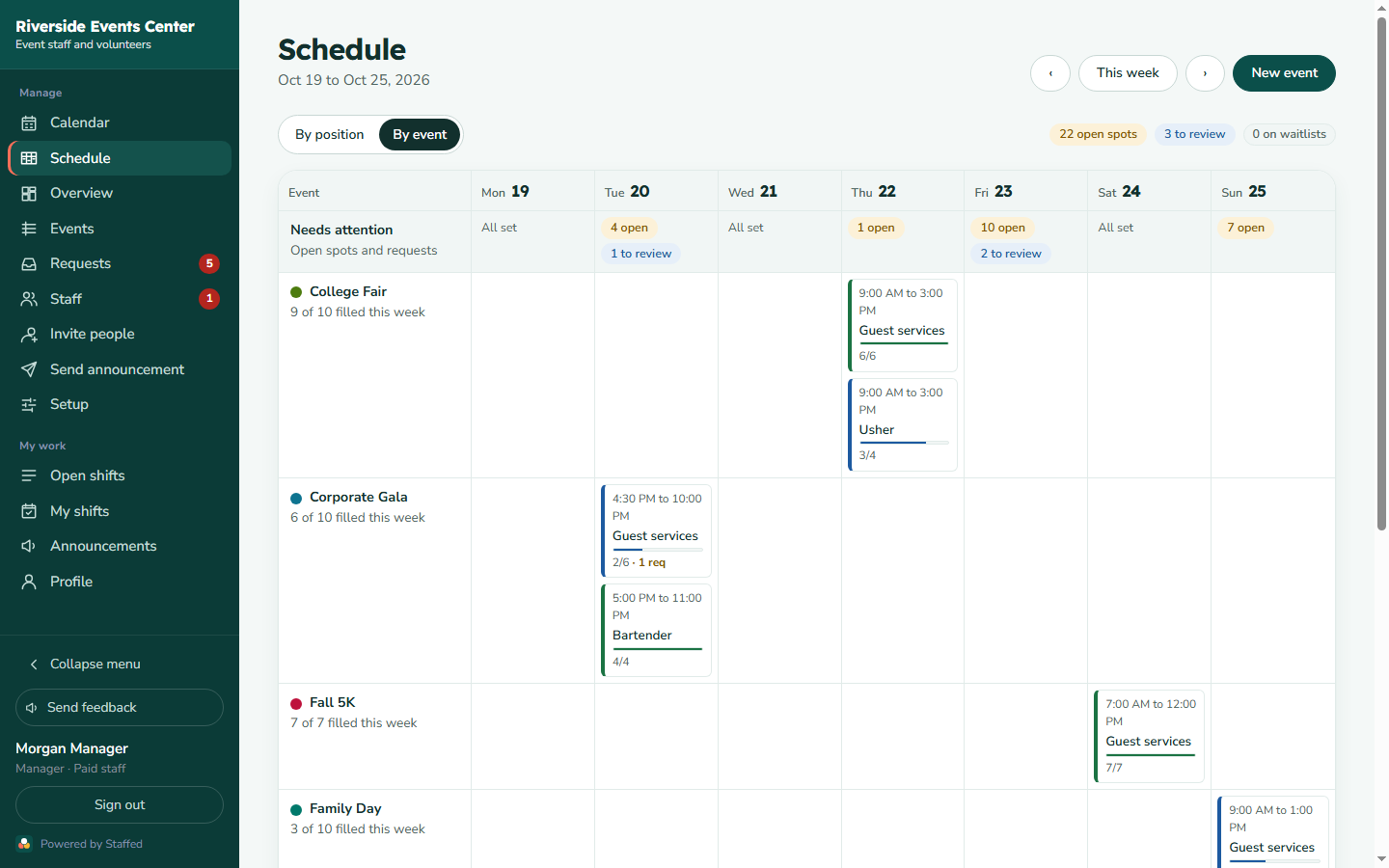
See the whole week, and who you still need
The schedule board shows every shift by position or by event, how full each one is, and what is waiting for your approval.
- A row at the top shows every open spot and request across the week
- Approve or decline right from the board
- A month calendar with each event in its own color
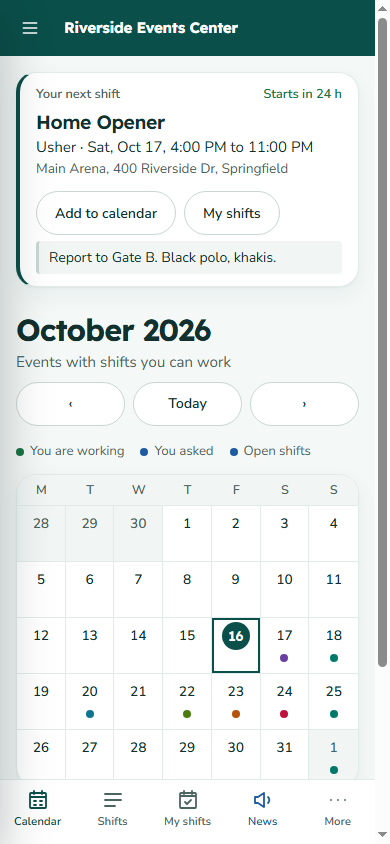
Their next shift, first thing on their phone
No app to install. People open a link and see where to be, when and what to wear, with one tap to add it to their calendar.
- Emails when shifts open, when they are confirmed, and the day before
- Announcements to everyone, one group or one event's crew
- Light and dark mode, and your organization's logo and colors
Volunteers and paid staff, side by side
Most events run on both. Staffed keeps them on one schedule and treats each the right way.
Paid staff
- Check in and out from their phone
- Managers fix and approve hours
- Hours export for the payroll you already use
- Certified roles, like alcohol service, only offered to people who hold the certification
Volunteers
- Join with a link or the QR code at your table
- Pick the shifts that fit their week
- Never tracked like employees
- Reminders that carry your organization's name and logo
How Staffed compares
| You need | Staffed | Typical shift apps | Sign-up sheets |
|---|---|---|---|
| Paid staff and volunteers together | Yes | Paid staff only | Volunteers only |
| Manager approves each request | Yes | Sometimes | No, first come first served |
| Waitlist that fills dropped spots | Yes, automatically | Rarely | On paid plans |
| Shifts grouped by event | Yes | No, a weekly roster | One sheet per event |
| Your logo and colors | Yes | Rarely | Paid plans |
| Free to start | Up to 25 people | Usually a trial | With ads |
Free for small crews
Priced per organization, not per person. Upgrade, downgrade or cancel anytime from your account.
Free
For a small crew getting started.
- Up to 25 people
- 3 upcoming events at a time
- Requests, approvals and email reminders
- Calendar and schedule board
Team
For organizations running events all season.
- Up to 150 people
- Unlimited events
- Waitlists and automatic spot offers
- Repeating events
- Invite links, QR codes, text invites, announcements
- Your logo and colors
- Roster spreadsheets
Pro
For paid staff, payroll and certified roles.
- Up to 500 people
- Everything in Team
- Check in and out, hours and payroll export
- Certifications on positions
Organization
Unlimited staff, AI agent connectors and hands-on onboarding.
- Unlimited people
- Everything in Pro
- AI agent connectors and webhooks
- Onboarding with our team
Prices in US dollars. Payments are handled securely by Stripe. Already a customer? Manage your plan and invoices.
Questions, answered
Do my staff and volunteers need to download an app?
No. Staffed works in any phone or computer browser. People get an email invite, set a password, and they are in. They can add it to their home screen if they like.
Can volunteers sign themselves up?
Yes. Share a join link or print the QR code for your table. You decide whether new people need your approval before they can request shifts.
Who decides who gets a shift?
You do. People request shifts and a manager approves or declines each one. If a shift is full, people can join the waitlist, and when someone drops, the next person is offered the spot.
Does Staffed run payroll?
No. On the Pro plan, paid staff check in and out, managers approve the hours, and you export them for the payroll system you already use.
What happens if I stop paying?
If a payment fails you keep your paid features for 7 days while you update your card. After that your organization moves to the Free plan. Nothing is deleted.
Can I cancel anytime?
Yes. Cancel from the Billing page in your account and your plan stays active until the end of the period you paid for.
How do I get help?
Use Send feedback inside the app, or email support@zabtek.com. A real person answers.
Everyone in the right place, every event.
Set up your organization in a few minutes. Free for up to 25 people.